Every capability. No fluff.
24 features across 5 categories. Each one earns its place, each one is load-bearing in a real developer's day. If you came here looking for a matrix of checkboxes — this is the matrix.
Persistence
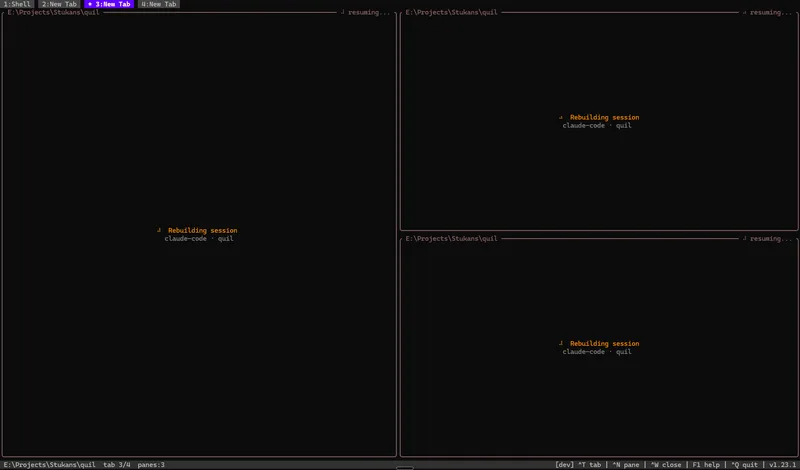
Reboot-proof sessions
Workspaces survive full host reboots. Type `quil` after a restart and everything snaps back.
- Continuous snapshot of tabs, panes, layout, and working directories to ~/.quil/workspace.json.
- Ghost buffers render the last 500 lines of each pane instantly while shells re-initialise. Large buffers are sent in 8 KB chunks with 2 ms yield between each to prevent input starvation.
- Pane split tree is serialised to JSON and restored on reconnect — same horizontal/vertical nesting, same ratios.
- Target boot-to-productive time: under 30 seconds.
Live CWD tracking
Pane borders show the shell's current directory in real time — no config, no manual hooks.
- Auto-injects OSC 7 hooks into bash, zsh, and PowerShell at spawn time.
- Fish emits OSC 7 natively, no injection needed.
- The directory shown on the pane border updates on every cd, pushd, and popd.
AI integration
AI session resume
Claude Code conversations resume automatically after a reboot. No copy-paste, no context rebuild.
- Each AI pane gets a UUID at creation time. On restart Quil runs `claude --resume <session-id>` automatically.
- Works for any AI tool that exposes a session ID — Claude Code (production) and OpenCode (beta) today, more to come.
- For tools without a session ID, plugins can fall back to regex scraping the last state or replaying a command.
MCP server for AI agents
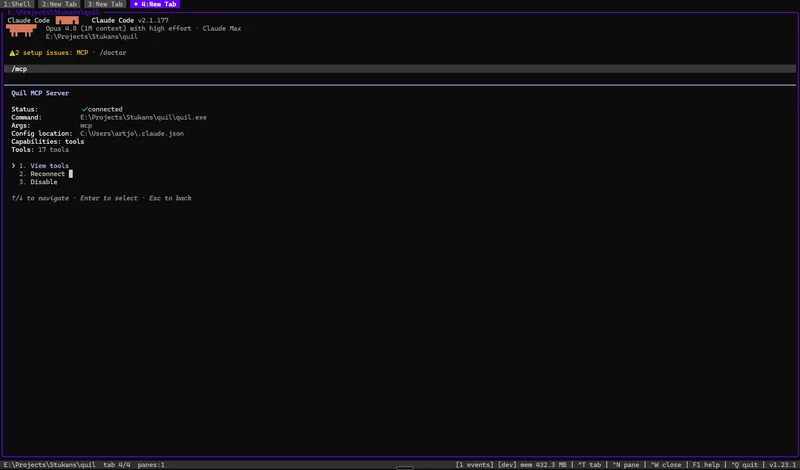
Run `quil mcp` and an AI agent can list panes, read output, send keystrokes, and snapshot your workspace.
- 18 tools exposed over the Model Context Protocol (Anthropic's open standard for AI tool use).
- Tools include: list/create/destroy panes, read pane output, send keys, switch tabs, screenshot a pane, watch the notification queue, query memory usage per pane, and more.
- Lets any MCP-capable client (Claude Desktop, Claude Code, Cursor) reach directly into your running Quil session.
Clipboard image paste
Press paste on a screenshot and Quil decodes it, saves a PNG, and types the file path into the active pane — works around Claude Code's broken Windows clipboard reader.
- Win32 DIB / DIBV5 reader handles screenshots from Snipping Tool, Win+Shift+S, and other capture apps.
- Decodes 24bpp BI_RGB and 32bpp BI_BITFIELDS, including the all-zero-alpha promotion that catches apps which leave the alpha channel uninitialised.
- Files land in ~/.quil/paste/quil-paste-<ts>-<rand>.png with owner-only 0o600 / 0o700 permissions and an 8-byte crypto/rand suffix so a co-tenant can't enumerate them.
- Sidesteps the upstream Claude Code Windows clipboard image bug (anthropics/claude-code#32791) — any AI tool with file-reading tools picks the file up via the typed path.
- Three paste keys: Ctrl+V (default), Ctrl+Alt+V, and F8. F8 is the recommended Windows trigger because Windows Terminal eats Ctrl+V before it reaches the TUI.
Agent work indicators
A spinner shows which AI panes are mid-turn; when one finishes or waits for your input, it stays marked green until you actually look at it.
- Work state is derived entirely from the agent's own hook events (Claude Code hooks, OpenCode plugin bus) — no output polling, no heuristics.
- While an agent works, a spinner animates on the pane border and its tab label.
- When a turn completes — or the agent parks on a permission prompt or a question — the pane border turns green and the tab label of a background tab turns green with it.
- No timer: the green mark persists until you focus that exact pane (click it, Alt+Arrow onto it, or switch to its tab). With several agent panes split in one tab, the border pinpoints which one needs you.
- A crash never shows a green mark — process exit clears the spinner without claiming the turn finished.
Input history
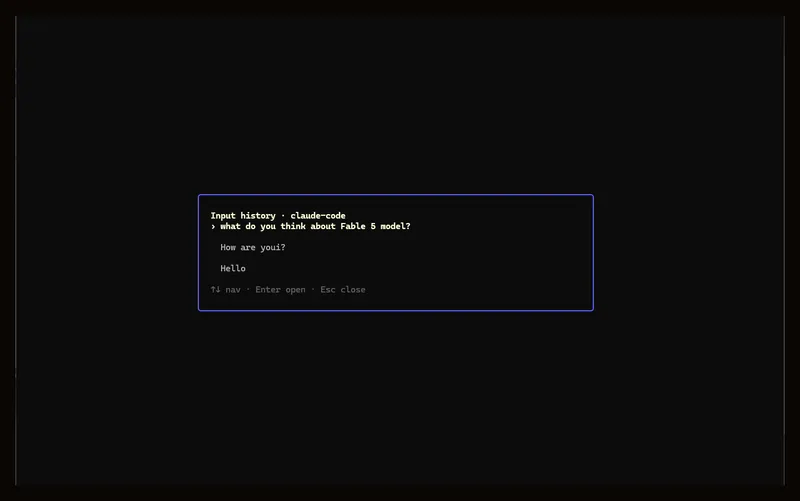
AI panes bury your prompt under a wall of output. Alt+Shift+I lists every prompt you submitted — open one full-text and copy it back.
- Alt+Shift+I opens a per-pane list of your past prompts as 3-line previews, newest first; Enter opens the full text in a read-only viewer you can scroll and copy from.
- Captured from the agent's own UserPromptSubmit hook, not keystroke scraping — multiline prompts, pastes, and edits are recorded exactly as submitted.
- Persists across daemon restarts at ~/.quil/history/<pane>.jsonl (64 KiB per entry, ring-trimmed to the last 200) and is removed when the pane is destroyed.
- Opt-in per pane type via `[command] record_history = true` (enabled for Claude Code); other pane types show an empty state. OpenCode support is planned.
Interaction
Typed panes
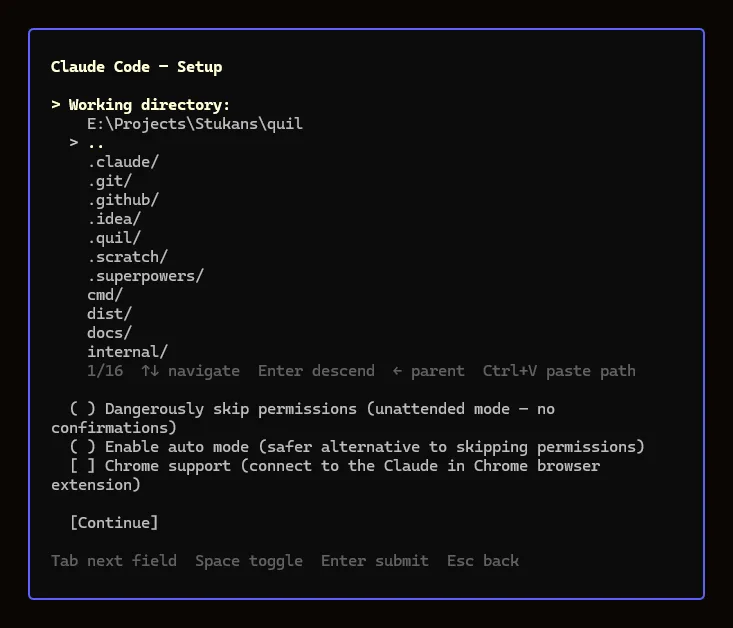
Terminals are not all the same. Quil understands pane types and gives each one context-aware behaviour — including a per-spawn setup dialog with directory browser and runtime checkboxes.
- Five built-in pane types: Terminal, Claude Code, OpenCode (beta), SSH, Stripe.
- Each type has its own resume strategy, error handler, and status line.
- Pane setup dialog (opt-in via plugin TOML): a directory browser pre-filled with the active pane's CWD plus one checkbox per declared `[[command.toggles]]` entry. claude-code uses both — picks up the project's `.claude/` context automatically and offers a `Dangerously skip permissions` toggle for unattended runs.
- Toggle state rides through the existing `InstanceArgs` IPC field and survives daemon restarts; no IPC schema changes.
- User-definable additional types via TOML plugin files in ~/.quil/plugins/.
tmux-style splits with spatial navigation
Arbitrarily nested horizontal and vertical splits with mouse hit-testing AND directional Alt+Arrow pane navigation that picks the closest neighbour, not the next leaf in the tree.
- Binary split tree, each split with its own direction and ratio.
- Click any pane to focus it; scroll wheel traverses terminal history.
- Click the scrollbar to jump the thumb; click-and-drag scrolls continuously. The hit zone is three cells wide so off-by-one clicks register as scroll instead of text selection.
- Spatial pane navigation: Alt+Left/Right/Up/Down focuses the closest neighbour in that direction. Three tie-breakers (gap, perpendicular overlap, perpendicular center distance) match tmux/vim/iTerm muscle memory.
- Drag any tab in the tab bar to reorder it — intermediate tabs slide one slot at a time. A click without motion still switches tabs. The active tab is prefixed with `* ` so it's visible at a glance even when colored.
- Tab and Shift+Tab are deliberately NOT bound globally — they fall through to the PTY so shell completion and Claude Code's mode-cycling work naturally. Splits live on Alt+Shift+H / Alt+Shift+V to keep Alt+V free for Claude Code's image paste.
- Focus mode (Ctrl+E) expands the active pane full-screen while others keep running in the background.
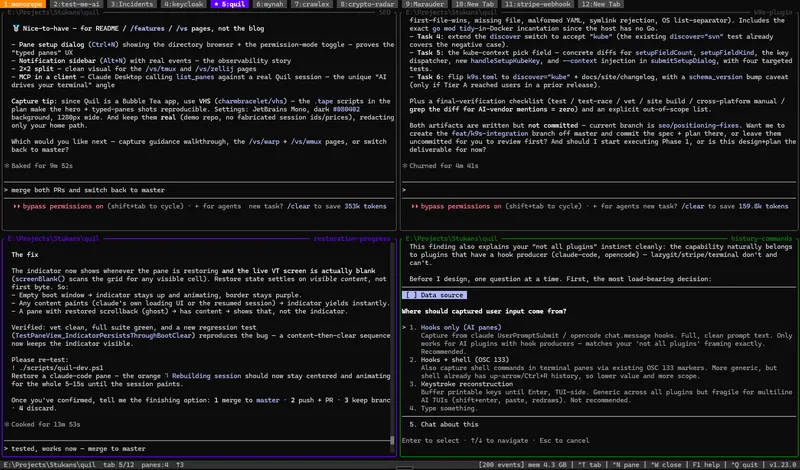
Mouse drag-resize splits
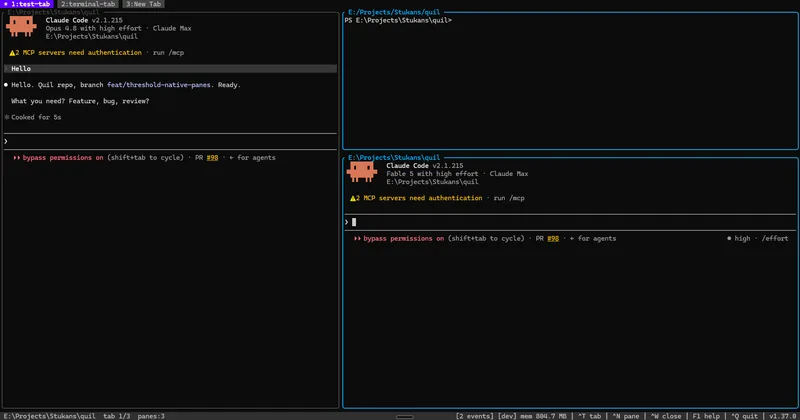
Grab any border between panes and drag — the split follows your mouse, every nested pane keeps its minimum size, and the child processes see exactly one resize when you let go.
- Click-and-drag any split border; the affected panes show a highlight while the drag is active.
- Works on arbitrarily nested layouts: the drag is clamped so every pane in both subtrees keeps the 10×4 minimum — not just the two panes touching the border.
- The grab zone is wider than the drawn line, and the drawn line always wins over the scrollbar where they overlap — no pixel hunting.
- PTY resize and layout persistence fire once, on mouse release — mid-drag the borders move locally, so TUI apps (claude-code, vim, htop) never see resize churn and never repaint mid-drag.
- The new ratios ride the existing workspace snapshot, so a drag-resized layout survives daemon restarts and reboots.
- Companion pane type — Terminal (keeps content on squeeze): the same shell on an AI-pane-style window-sized canvas, for log tails and watch loops where content survival matters more than width-perfect formatting.
Right-click pane menu
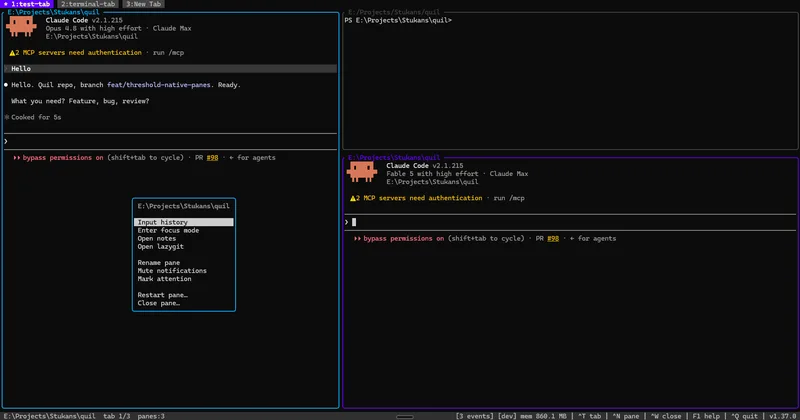
Right-click any pane for a per-pane action menu — history, focus, notes, lazygit, rename, mute, attention pin, restart, close — no keybinding memorization required.
- Right-click a pane (or press Alt+A for the active pane) to open a popup targeting the pane under the cursor — its border lights up so there's never doubt which pane the actions will hit, and the menu header shows the pane's name.
- Nine actions in three groups: view (input history, enter/exit focus mode, notes, lazygit), pane settings (rename, mute notifications, mark attention), and destructive (restart, close — both keep their confirmation dialogs).
- Hover highlights the row under the mouse; arrow keys / j / k navigate; unavailable actions grey out (input history without an AI pane, lazygit without the binary installed).
- Mark attention pins a green border that survives focusing the pane — a manual "don't let me forget this one" flag, cleared only by unmarking.
- Right-click with a text selection active still copies it — the menu only opens on a plain right-click.
Pane notes
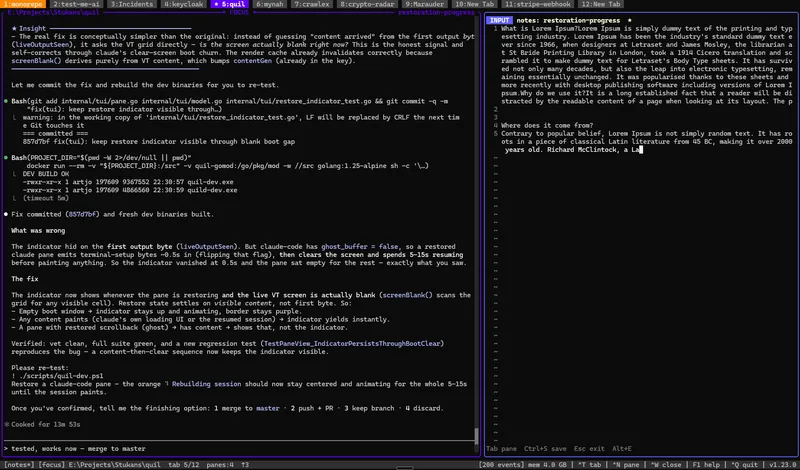
Alt+E opens a plain-text editor beside any pane. Notes save automatically and travel with the workspace.
- Markdown-compatible plain text, rendered as the pane loses focus.
- 30-second debounce auto-save, Ctrl+S for explicit save.
- Side-by-side layout so you can take notes while the pane keeps producing output.
Three build variants
Production, dev, and debug binaries — each self-contained with the right log level and data directory baked in at compile time.
- `quil.exe` / `quild.exe` — production build, stripped symbols, normal log level, data in ~/.quil/.
- `quil-dev.exe` / `quild-dev.exe` — auto dev mode (data in .quil/ next to the binary), debug logging, finds its matching `quild-dev` daemon. Just double-click — no --dev flag or env vars needed.
- `quil-debug.exe` / `quild-debug.exe` — debug logging against the production data directory. Useful for diagnosing issues in the live workspace.
- Each variant auto-starts its matching daemon. `./scripts/dev.sh build` produces all 6 binaries in one Docker run.
Cross-platform from day one
Native Linux, macOS, and Windows support. No WSL required.
- PTY via creack/pty on Unix, ConPTY on Windows.
- IPC via Unix domain sockets on Linux/macOS, Named Pipes on Windows.
- Pre-built binaries for linux/amd64, linux/arm64, darwin/amd64, darwin/arm64, windows/amd64.
Extensibility
TOML plugin system
Declare a new pane type in a single TOML file. No compilation, no restart, hot-reload on save.
- Plugin definitions live in ~/.quil/plugins/<name>.toml.
- Sections: [plugin], [spawn], [keys], [resume], [error], [status] — each optional.
- Declarative config means no shell scripting footguns; the daemon validates the TOML at load time.
Plugin auto-upgrade
When Quil ships new plugin features, a side-by-side merge dialog lets you reconcile your config with the new defaults — no silent breakage, no lost customizations.
- Each embedded default plugin carries a `schema_version` number. On startup, Quil compares your on-disk version with the shipped default.
- If yours is older, a full-screen split view opens: your config on the left (editable), the new default on the right (read-only). Diff highlighting shows red for your custom lines and green for new additions.
- Ctrl+C / Ctrl+V to copy lines from the default into your config, Ctrl+S to save, F5 to accept the full default. Esc is blocked — migration must be resolved before the workspace loads.
- Multiple stale plugins get a tab bar. Each must be resolved independently.
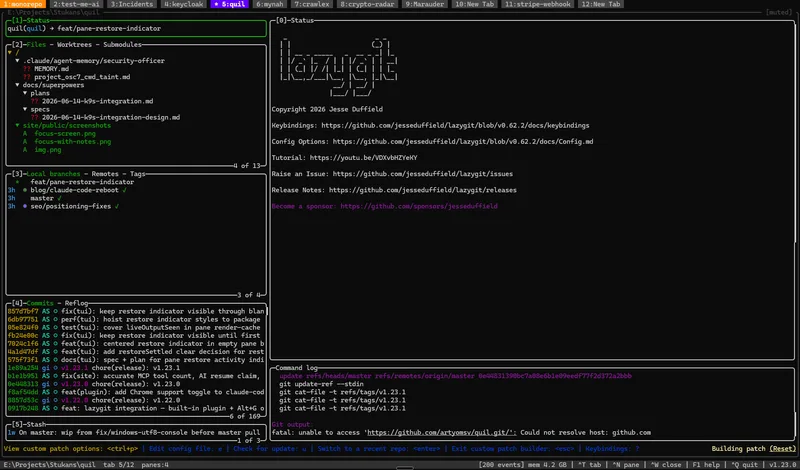
Lazygit overlay
Press Alt+G to drop a full-tab git UI over any pane — pointed at the repository of whatever directory that pane is working in.
- Alt+G toggles a per-tab lazygit overlay for the repository resolved from the active pane's working directory; press it again to hide — the process keeps running, so re-opening is instant with lazygit's UI state intact.
- Repositories are discovered automatically near the pane (the enclosing repo plus one level down); when several are found, a picker lets you choose which to open.
- Also available as an ordinary pane via Ctrl+N → Tools → Lazygit, where the setup dialog lists the same discovered repositories with a Browse… fallback.
- Overlays are ephemeral — one per tab, never persisted, recreated with one keypress, and auto-destroyed when you quit lazygit. Offered only when the lazygit binary is on PATH.
k9s for Kubernetes
Open k9s as a pane (Ctrl+N → Tools → k9s) to drive your Kubernetes cluster, with a context picker sourced from your kubeconfig.
- k9s opens as an ordinary pane (not an overlay — it's a long-lived monitoring view you can split alongside your other panes).
- The setup dialog lists the contexts from your KUBECONFIG / ~/.kube/config (current one marked) and pins the pane to your choice via --context; "Default context" uses the kubeconfig's current-context.
- A read-only toggle (--readonly) lets you browse a cluster with all mutating commands disabled, and a start-on-Pods toggle jumps straight to the pods view.
- Cross-platform (Windows, macOS, Linux). Offered only when the k9s binary is on PATH — otherwise it shows greyed in Ctrl+N with a link to install it. Re-runs and reconnects on daemon restart.
lazysql for databases
Open lazysql as a pane (Ctrl+N → Tools → lazysql) to browse and query MySQL, PostgreSQL, SQLite, and MSSQL from its connection manager.
- lazysql opens as an ordinary pane into its own connection manager — split it alongside your app and AI panes.
- By design there's no Quil-side connection picker: lazysql's only launch argument is a full connection string with embedded credentials, so Quil never reads its config or injects a DSN. Credential handling stays inside lazysql (which supports ${env:VAR} substitution to keep passwords out of its config).
- A read-only toggle (--read-only) opens a session with data modification disabled.
- Cross-platform (Windows, macOS, Linux). Offered only when the lazysql binary is on PATH — otherwise greyed in Ctrl+N with a link to install it. Re-runs on daemon restart.
Observability
Notification center
Quil detects when a pane exits, errors, or goes idle and surfaces it in a dedicated sidebar.
- Daemon-side event queue with pattern-matching idle analysis.
- Process exit detection with exit-code extraction.
- Optional sidebar surfaces notifications without interrupting focused work.
Memory reporting
Per-pane memory accounting in the status bar and a collapsible breakdown dialog (F1 → Memory).
- Daemon-side 5 s collector snapshots Go-heap (output ring buffer + ghost snapshot + plugin state) and PTY child resident memory per pane.
- Cross-platform RSS: /proc/<pid>/status on Linux, ps -o rss= batched on Darwin, GetProcessMemoryInfo on Windows.
- Status bar gains a `mem <n>` segment refreshed every 5 s; F1 → Memory opens a tab/pane tree with expand/collapse and notes-editor byte accounting.
- Two MCP tools — `get_memory_report` (per-tab totals + grand total) and `get_pane_memory` (single-pane detail) — expose the layers for external agents.
Client/daemon version handshake
Upgrade in one step. The client checks the running daemon's version on attach and self-heals when they drift.
- TUI handshakes with the daemon before attaching. Older daemon → prompt, gracefully stop, auto-spawn the matching daemon from alongside the TUI binary.
- Newer daemon than client → TUI refuses to attach and points to the releases page (avoids subtle protocol drift bugs).
- Dev/debug builds and unstamped local builds skip the check.
- Backed by a new IPC pair (MsgVersionReq/MsgVersionResp) and a shared `internal/version/` package with proper semver comparison — no more lexical-ordering traps with 1.10.0 vs 1.9.0.
Self-healing daemon
A wedged AI pane can't freeze your workspace, and `quil restart` recovers anything in one command — tabs and AI sessions restored from the last snapshot.
- `quil restart` stops the daemon with bounded escalation (graceful IPC shutdown with final snapshot → SIGTERM → force-kill, each tier timed out so even a deadlocked daemon can't stall it), cleans stale pid/socket files, starts fresh, and reopens the TUI.
- Prints the target environment first — production (~/.quil) vs dev (QUIL_HOME) — so you can never kill the wrong daemon. PID-reuse guard: a recorded PID is only signaled if it actually belongs to a quild binary.
- Per-pane input isolation: every pane's stdin is written by its own goroutine behind a bounded queue. A process that stops reading input costs you a 'Pane not accepting input' sidebar warning on that one pane — everything else stays interactive. Alt+R restarts the stuck pane in place with its AI session resumed.
- Liveness watchdog: if no workspace snapshot completes for 2 minutes, the daemon writes a full goroutine stack dump to quild.log — a wedge becomes a precise bug report instead of a silent freeze.
Leveled logging + in-app log viewer
A single `[logging] level` setting controls 152 existing log call sites and the new debug helpers. F1 opens read-only viewers for the client, daemon, and MCP logs.
- `internal/logger` wraps Go's stdlib `slog` and bridges every existing `log.Printf` call site at info level — old and new code respect one filter.
- Flip `[logging] level = "debug"` in config.toml to trace clipboard pipeline, per-key handler decisions, and Win32 image read step-by-step.
- F1 → About → View client log / daemon log / MCP logs opens a read-only TextEditor viewing the tail (256 KB) of each file. Symlink-rejecting via os.Lstat plus a re-stat through the open handle defeats TOCTOU swap.
- Alt+Up / Alt+Down jump the cursor by `[ui] log_viewer_page_lines` (default 40, configurable). The same `TextEditor.ReadOnly` flag is now available for any other look-but-don't-touch dialog.
- Hot-path Debug calls pre-check `slog.Enabled` so the fmt.Sprintf is skipped entirely when filtered out — important for the per-keystroke trace.
- The shared TextEditor now supports Ctrl+C (copy selection), Ctrl+Y (delete line), and Ctrl+X (cut) — used across log viewers, plugin TOML editor, pane notes, and the migration dialog.